Internet Speed Test
Internet Speed Test – Ultra-Fast, Accurate & Real-Time Online Speed Checker
Experience the most advanced Internet Speed Test tool designed to measure your download speed, upload speed, ping, jitter, latency, and overall network performance with precision. Whether you’re troubleshooting a slow connection, comparing ISP performance, or optimizing home Wi-Fi, this real-time speed checker gives you clear, reliable results within seconds.
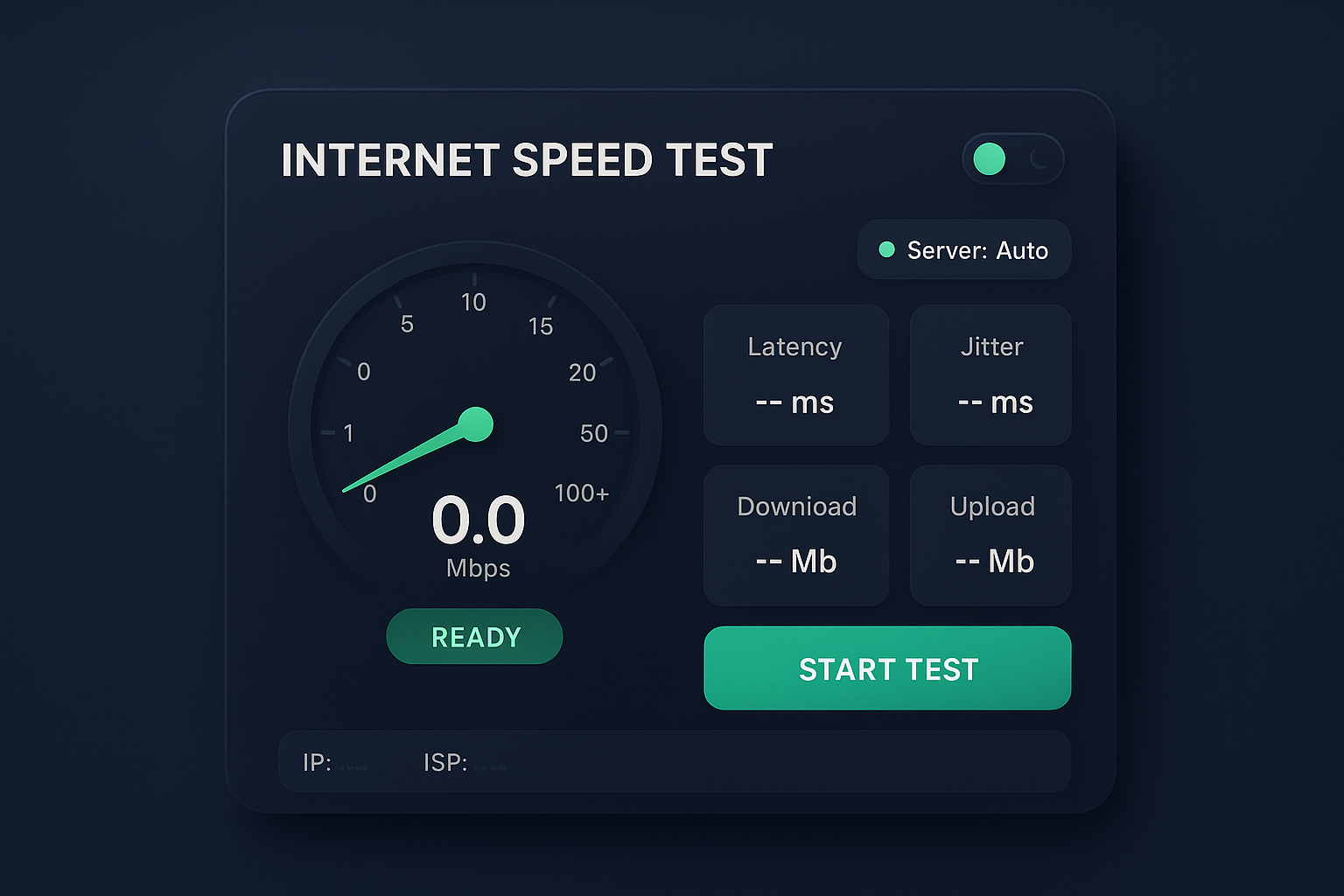
Our professional-grade speed test uses a 3D gauge meter, live needle animations, and instant data analytics to help you understand exactly how your network is performing—without installing any app or software.
What Is an Internet Speed Test?
An Internet Speed Test is a browser-based tool that measures the performance of your internet connection by analyzing:
- Download Speed (Mbps)
- Upload Speed (Mbps)
- Ping (ms)
- Jitter (ms)
- Server Response Time
- Network Stability
- Real-time bandwidth fluctuations
The tool simulates network activity by sending and receiving small and large files to a nearby test server. By tracking how quickly the data moves, the speed test determines your connection quality.
This testing method is essential for anyone using:
- Home broadband
- Fiber internet
- 4G/5G mobile data
- Office Wi-Fi networks
- Gaming consoles
- Smart TVs
- Routers and modems
- VPN connections
Features of the Modern Pro-Level Internet Speed Test
1. 3D Gauge Speedometer with Real-Time Needle Rotation
The large central gauge is designed to resemble an automotive performance meter, giving users an intuitive idea of how fast their internet connection is accelerating.
Keywords: internet speed gauge, real-time Mbps meter, speedometer-style internet checker, 3D internet speed UI.
2. Accurate Download & Upload Speed Measurement
The speed test measures:
- Download speed – how fast you can receive data
- Upload speed – how fast you can send data
These tests are crucial for:
- HD & 4K Streaming
- Online gaming
- Video conferencing
- Cloud file uploads
- Remote work tools
3. Ping (Latency) & Jitter Measurement
Latency directly affects:
- Gaming responsiveness
- Voice/video call quality
- Remote desktop smoothness
Jitter measures how inconsistent your connection is. A low jitter value means a stable, reliable network.
Keywords: ping test online, jitter test tool, latency checker.
4. Light Mode & Dark Mode Toggle
The UI includes a smooth theme switching mechanism with:
- Stylish neon green accents
- Futuristic gradients
- Smooth transitions
Perfect for both dark interface lovers and daytime users.
5. Server Badge & Auto Server Selection
The top-right badge shows the selected speed test server.
- Automatically selects the closest server
- Displays server responsiveness
- Indicates connection status
Keywords: speed test server selection, nearest speed server, server ping test.
6. Real-Time IP & ISP Detection
The widget automatically fetches:
- Public IP address
- Internet Service Provider
- Network details
Keywords: what is my IP, ISP identifier, network provider speed test.
7. Responsive, Mobile-Optimized Design
Even though the widget has a wide desktop layout (1070px), it collapses beautifully on smartphones with:
- Full-width mode
- Scaled gauge
- Compact stat cards
- Touch-friendly UI
Why Run an Internet Speed Test?
1. To Verify Your ISP’s Promised Speed
If your plan claims 100 Mbps, but you consistently see 20 Mbps, your provider may be under-delivering.
2. To Diagnose Slowness
If Netflix is buffering or video calls are lagging, a speed test quickly reveals whether the issue is:
- Your internet
- Your router
- Your Wi-Fi signal
- A temporary outage
3. To Optimize Router & Wi-Fi Placement
Running the test from multiple rooms helps diagnose:
- Dead zones
- Weak Wi-Fi spots
- Interference issues
4. To Compare Different Networks
Useful when choosing among:
- Fiber vs broadband
- 4G vs 5G
- Different ISPs
- Home vs office networks
5. To Improve Gaming Experience
Gamers need:
- High download speed (20 Mbps+)
- High upload speed (5 Mbps+)
- Low ping (<40 ms)
- Low jitter (<5 ms)
Understanding Each Speed Test Metric
1. Download Speed (Mbps)
Download speed is the rate at which data is transferred from the internet to your device.
Good Download Speeds
- 10–25 Mbps → Web browsing, SD video
- 50–100 Mbps → HD/4K streaming, households
- 200–500 Mbps → Heavy streaming & downloads
- 1 Gbps+ → Ultra-fast fiber
2. Upload Speed (Mbps)
Upload speed is especially important for:
- Zoom/Teams video calls
- Uploading photos/videos
- Cloud backup
- Online gaming
Faster upload speeds mean smoother real-time communication.
3. Ping (Latency)
Ping tells how quickly your device can communicate with a server.
Ping Categories:
- 0–20 ms → Excellent
- 20–40 ms → Good
- 40–80 ms → Playable
- 80–150 ms → Slow
- 150+ ms → Poor
Gamers depend heavily on low latency.
4. Jitter
Jitter measures the variation in ping over time.
A jitter above 10 ms indicates unstable internet, causing:
- Voice call distortion
- Video call freezes
- Dropped frames in gaming
The stat card shows jitter clearly so users can judge connection consistency.
How the Interactive Gauge Creates a Real-Time Experience
The unique gauge system uses:
- Rotating SVG needle
- Animated tick marks
- Speed-level color highlights
- 3D shadows and neon effects
- Tabular numeric output inside the meter
This UX is designed to:
- give a sense of speed buildup,
- mimic real-world motion,
- and help users visually understand their Mbps levels.
Unlike classic line graphs or simple numeric displays, this immersive gauge meter makes the speed test engaging and visually appealing.
Why This Speed Test Interface Stands Out
- ✔ Neon-accent futuristic layout
- ✔ Smooth animations & transitions
- ✔ Real-time gauge movement
- ✔ Professional network statistics
- ✔ Clear metric cards with highlighting
- ✔ Theme switching for better UX
- ✔ Auto server detection
- ✔ Mobile-friendly redesign
- ✔ 3D depth and shadows
- ✔ IP, ISP, and connection info display (Privacy Policy of Server)
Best Use Cases for This Speed Test Tool
- 1. Regular Home Internet Testing
- Users can verify their day-to-day broadband speed.
- 2. Office & Corporate Networks
- Helps monitor router or VPN performance.
- 3. Gamers Optimizing Ping
- Check real-time latency before joining online matches.
- 4. Content Creators & Streamers
- Upload speed is crucial for:
- Twitch streaming
- YouTube uploads
- Cloud backups
- 5. Smartphone & Wi-Fi Diagnostics
- Move around different rooms and test signal strength differences.
How to Get the Most Accurate Speed Test Results
Follow these tips to ensure accurate readings:
- Disconnect other devices temporarily
- Stand near your router
- Avoid running downloads in the background
- Use a 5 GHz Wi-Fi band if available
- For maximum accuracy → test using an Ethernet cable
- Run the test 2–3 times and average the values
- Compare results during peak and off-peak hours
FAQ – Internet Speed Test
- 1. What is an Internet Speed Test?
An Internet Speed Test measures your download speed, upload speed, ping, and jitter to determine your connection quality. - 2. How does this speed test work?
It sends and receives small data packets to analyze how fast and stable your network connection is. - 3. What makes this speed test different?
It features a modern 3D gauge, dark/light theme toggle, real-time speed stats, and highly accurate measurement algorithms. - 4. What is download speed?
Download speed shows how fast data is received from the internet to your device. - 5. What is upload speed?
Upload speed indicates how quickly your device sends data to the internet. - 6. What is ping?
Ping (latency) shows how quickly your device communicates with a server—important for gaming and video calls. - 7. What is jitter?
Jitter measures fluctuations in ping and indicates how stable your connection is. - 8. Is this speed test accurate?
Yes, it uses advanced measurement techniques for precise and reliable results. - 9. Can this test check Wi-Fi and mobile data?
Yes, it works for Wi-Fi, broadband, fiber, 4G, 5G, and hotspot connections. - 10. Can I use it on office networks?
Absolutely, it works perfectly on office LAN, corporate networks, and proxy-based systems. - 11. Who can benefit from this speed test?
Gamers, professionals, students, streamers, and network engineers can all use it to analyze connection quality. - 12. Why is my speed lower than what my ISP promises?
Speeds depend on network load, router quality, distance from Wi-Fi, and ISP bandwidth limitations. - 13. Does high ping affect gaming?
Yes, high ping causes lag, delays, and poor multiplayer performance. - 14. What causes jitter?
Network congestion, poor Wi-Fi signals, and unstable routes can increase jitter. - 15. Do browser extensions affect speed test results?
Yes, VPNs, proxies, and some extensions may alter your speed. - 16. Can server location affect speed?
Yes, testing on a distant server can show higher ping and lower speeds. - 17. Should I close apps while testing?
For best results, close downloads, streaming apps, or active cloud sync. - 18. Can this test help diagnose slow internet?
Yes, it can identify issues like unstable Wi-Fi, packet loss, or low bandwidth. - 19. Is this test free to use?
Yes, it is completely free with unlimited testing. - 20. How often should I check my speed?
You can test anytime you face slow browsing, lag, buffering, or connection drops.
Conclusion: Internet Speed Test
This Internet Speed Test offers a highly advanced and beautifully designed way to check your connection performance. With a sleek 3D gauge, theme toggle, real-time stats, and accurate measurement of download, upload, ping, and jitter, it is perfect for everyday users, professionals, gamers, students, and even network engineers.
It helps diagnose network issues, verify ISP performance, and understand your connection quality in seconds.
Whether you’re testing fiber internet, broadband, 5G, Wi-Fi, or office networks, this premium speed test UI gives you the accuracy and visual experience you won’t find in standard tools.
Search Keywords
internet speed test, online speed test, wifi speed test, broadband speed checker, fiber speed test, 5G speed test, upload speed test, download speed test, ping test, jitter test, network diagnostics tool, ISP internet test, real-time speed monitor, fast speed test, accurate internet tester, network performance test, home wifi checker, office internet speed test, gaming ping test, latency test, best speed test tool, advanced internet meter, online internet checker
Our Other Online Calculators
You Can Also Check Out Our Other Free Online Tools Like Age Calculator, Percentage Calculator, Body Fat Calculator, And More.”
Are You Searching For A Government Job In India
You Can Also Check Our Job Alert, Admit Card, And Sarkari Result Updates On ExamJobAlert.com – Your Trusted Source For Government Job Notifications.