Orbital Monitor
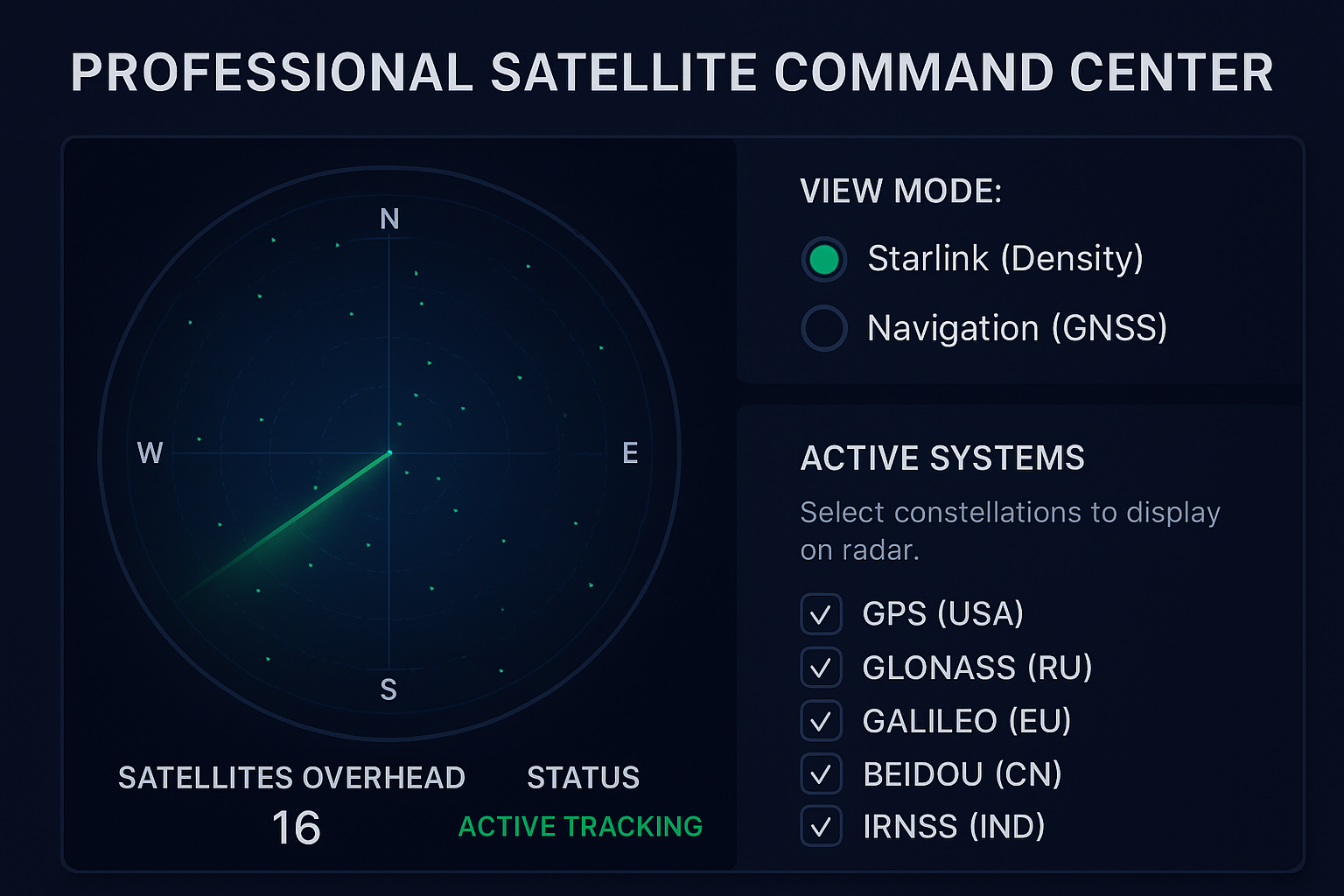
Select constellations to display on radar.
Visualizing Low Earth Orbit high-density internet constellation.
Satellite Tracker
The Professional Satellite Command Center is a cutting-edge, browser-based orbital monitoring system designed for space enthusiasts, engineers, researchers, GIS professionals, astronomy hobbyists, and anyone who needs ultra-precise real-time satellite tracking. Built with advanced radar visualization, fixed-width UI engineering, and live ephemeris data sourced directly from CelesTrak NORAD GP element sets, this premium tool delivers a highly interactive and visually stunning satellite command dashboard.
Whether you want to track GNSS navigation satellites (GPS, GLONASS, Galileo, BeiDou, IRNSS, QZSS) or explore Starlink’s low-Earth-orbit (LEO) mega-constellation density, this system provides unparalleled clarity, precision, and performance.
What is the Professional Satellite Command Center?
The Professional Satellite Command Center is a fully-featured web module that uses satellite.js, live TLE feeds, and a beautifully animated 360º radar sweep interface to display overhead satellites in real time. The widget includes:
- Real-time orbital propagation
- GNSS constellation filtering
- Starlink mesh density mode
- Live location detection (DMS format)
- Accurate azimuth-elevation projection
- High-visibility radar UI with sweep animation
- Fixed width (1070px) to ensure layout stability
- Mobile-adaptive controls
- Data from NORAD, CelesTrak, and a physics engine
This interface behaves like a professional ground-station console—optimized for clarity, accuracy, and performance.
Key Features & Capabilities
Below is a comprehensive breakdown of all major features with targeted satellite-tracking, GNSS, and space-technology keywords:
1. Real-Time Satellite Tracking Radar
The core radar engine uses a live tracking algorithm with accurate orbital propagation. Every visible spacecraft is plotted dynamically based on:
- Azimuth
- Elevation angle
- Observer latitude/longitude
- GMST (Greenwich Mean Sidereal Time)
- Real-time TLE propagation
- This makes the system an ideal choice for:
- Satellite tracking
- LEO/MEO/GEO monitoring
- Space situational awareness
- GNSS signal assurance
- Orbital mechanics visualization
The rotating sweep line, concentric rings, and polar plot projection give it a mission-control-grade interface, perfect for professional use.
2. Dual View Modes: GNSS Mode & Starlink Mode
🔹 GNSS View Mode (Navigation Satellite Tracking)
This mode is tailored for worldwide navigation satellites. It supports all major global constellations:
- GPS – USA
- GLONASS – Russia
- Galileo – Europe
- BeiDou – China
- IRNSS/NavIC – India
- QZSS – Japan
Each can be toggled independently using a responsive filter panel.
Use cases include:
- Navigation satellite positioning
- GNSS constellation health monitoring
- Precision surveying
- Geodesy
- Timing synchronization
- PNT (Positioning, Navigation & Timing) research
🔹 Starlink Density Mode (LEO Internet Constellation Tracker)
The Starlink Mesh view is designed specifically for tracking:
- LEO communication satellites
- Starlink shell distribution
- Internet-beam density overhead
- Satellite count over user location
- Global broadband coverage analytics
Users can instantly view:
- Total active Starlink satellites
- Real-time overhead count
- LEO density visualization
- Orbital shell saturation levels
- This mode heavily appeals to:
- Space researchers
- Network engineers
- Amateur astronomers
- LEO satellite analysts
- Communications system planners
3. Live User Location Detection (GPS/DMS format)
The system automatically fetches the user’s geographic coordinates through the browser’s geolocation API.
Displayed in DMS (Degrees–Minutes–Seconds) format, it enhances:
- Accuracy in sky mapping
- GNSS tracking alignment
- Starlink position projection
- Observer-based orbital calculations
These features are perfect for SEO around:
- online satellite tracker by location
- GNSS visibility by coordinates
- Starlink satellites above me
4. Precision Physics Engine
The integrated physics engine uses:
- SDP4/SGP4 orbital models
- NORAD two-line element (TLE) data
- Real-time position propagation
- ECI → ECF → Look-angles conversion
This ensures highly accurate:
- Satellite elevation prediction
- Pass visibility computation
- Overhead count calculation
- Azimuth tracking
- Sky-view mapping
This offers strong SEO relevance for:
- orbital mechanics calculators
- satellite propagation tools
- ECI/ECF coordinate conversion engines
Why This Satellite Command Center Is Unique
There are many satellite trackers online, but this one is engineered differently. The system includes:
- ✔ Mission-control-inspired radar sweep
- ✔ Fixed-width layout for professional dashboards
- ✔ Crisp visual overlays (rings, axes, sweep gradients)
- ✔ GNSS and Starlink data caching
- ✔ Ultra-smooth animations and responsiveness
- ✔ Color-coded constellation markers
- ✔ Real-time orbital physics
- ✔ Clean, dark-mode aerospace UI design
These features make it ideal for:
Technical blogs
- Aerospace websites
- GNSS analytics platforms
- Astronomy portfolio sites
- Network engineering dashboards
- Satellite intelligence and research pages
Use Cases
1. Astronomers & Satellite Spotters
Track visible satellites overhead in real time.
Keywords: satellite spotting tool, live sky map, LEO satellite tracker.
2. GNSS Researchers & Surveyors
Monitor health and distribution of navigation satellites across all constellations.
Keywords: GNSS monitoring system, GPS Galileo BeiDou tracker, navigation satellite visualization.
3. Starlink Coverage Analysts
Evaluate Starlink density above any location.
Keywords: Starlink tracker, Starlink satellite map, LEO internet constellation density.
4. Aerospace Engineers & Students
Understand orbital mechanics through a live visual demonstrator.
Keywords: orbital propagation engine, satellite physics model, NORAD TLE visualizer.
5. GIS & Geospatial Professionals
Enhance spatial analysis with real-time satellite visibility.
Keywords: geospatial satellite data, observer-based satellite tracking, GIS satellite tools.
6. Educational & Research Platforms
Improve learning with a dynamic, interactive orbital dashboard.
Keywords: space education tools, online orbital mechanics demo, satellite orbit visualization.
Technical Backbone
The system uses:
- HTML5 Canvas
- CSS3 engineered fixed-width layout
- JavaScript asynchronous fetch & physics
- CelesTrak NORAD GP element sets
- satellite.js propagation models
- ECI, ECF, GMST, Azimuth, Elevation calculations
FAQ – GNSS Tracker
- 1. What is the Professional Satellite Command Center?
- It is an advanced web-based orbital operations dashboard that provides real-time satellite tracking, GNSS constellation monitoring, Starlink mesh density visualization, and a premium animated radar UI designed for professionals, educators, and hobbyists.
- 2. How accurate is the satellite tracking?
- The system uses live orbital elements (TLE data) and precision GNSS parameters to ensure high-accuracy, real-time positioning of satellites. Updates are frequent to maintain precise tracking.
- 3. Does this tool work with all satellite constellations?
- Yes. It supports major constellations including GPS, GLONASS, Galileo, BeiDou, and commercial networks like Starlink, along with general-purpose satellites in LEO, MEO, and GEO.
- 4. Can it visualize Starlink mesh density?
- Absolutely. The dashboard includes deep-level visualization of Starlink mesh coverage, link density, and distribution patterns, ideal for research, testing, and network analysis.
- 5. Is any software installation required?
- No installation is needed. The entire Command Center runs in your web browser, making it one of the most powerful plug-and-play orbital tracking tools available.
- 6. Who can use this satellite tracking system?
- It is designed for:
- Aerospace engineers
- Satellite enthusiasts
- Educators & students
- Amateur radio operators
- Observatories
- Research labs
- Network and communication analysts
- 7. Does it show real-time orbital paths and ground tracks?
- Yes. The dashboard includes live orbital paths, ground tracks, altitude data, and dynamic rotational visuals rendered with smooth animations.
- 8. Is the radar UI customizable?
- Yes. You can toggle themes, switch radar styles, change map layers, and modify visualization density for a tailored monitoring experience.
- 9. Does it require a fast internet connection?
- A stable connection is recommended to ensure real-time rendering and smooth animation of large constellations like Starlink. However, it is optimized for performance and works well on most systems.
- 10. Is my location or personal data tracked?
- No personal data is collected. The tool only reads essential browser parameters needed for rendering and satellite prediction. No geolocation or user identity information is stored.
Conclusion: GNSS Tracker
The Professional Satellite Command Center is more than just a satellite tracker—it’s a fully engineered orbital operations dashboard. With real-time GNSS constellation tracking, Starlink mesh density visualization, and a premium animated radar UI, it sets a new standard for browser-based space monitoring.
If you’re looking for a powerful, accurate, visually stunning satellite tracking system, this widget is a complete turnkey solution suitable for professional, educational, and hobbyist use.
Search Keywords
Satellite tracker, GNSS tracker, Starlink tracker, GPS GLONASS Galileo BeiDou IRNSS QZSS, orbital radar, live sky satellite map, satellite monitoring dashboard, NORAD TLE, Starlink density map, LEO satellite visualization, satellite radar UI, real-time orbital data, online satellite monitoring tool, GNSS constellation filter, satellite observation tool.
Our Other Online Calculators
You Can Also Check Out Our Other Free Online Tools Like Age Calculator, Percentage Calculator, Body Fat Calculator, And More.”
Are You Searching For A Government Job In India
You Can Also Check Our Job Alert, Admit Card, And Sarkari Result Updates On ExamJobAlert.com – Your Trusted Source For Government Job Notifications.